
One job. Every tool. No re-typing.
XactSuite is a set of connected tools for restoration contractors who estimate in Xactimate. Each tool does one job well. Together they carry a reconstruction job from the first estimate to the final walkthrough, built from inside the trade to protect margin and cut the busywork.
How the suite works together
Upload the reports once. Every job lives in XactHub, the suite's shared job file. The Xactimate Summary, TAM and Components reports go in once, and every connected tool reads from that same job. One company login and one company code bring your whole team in.
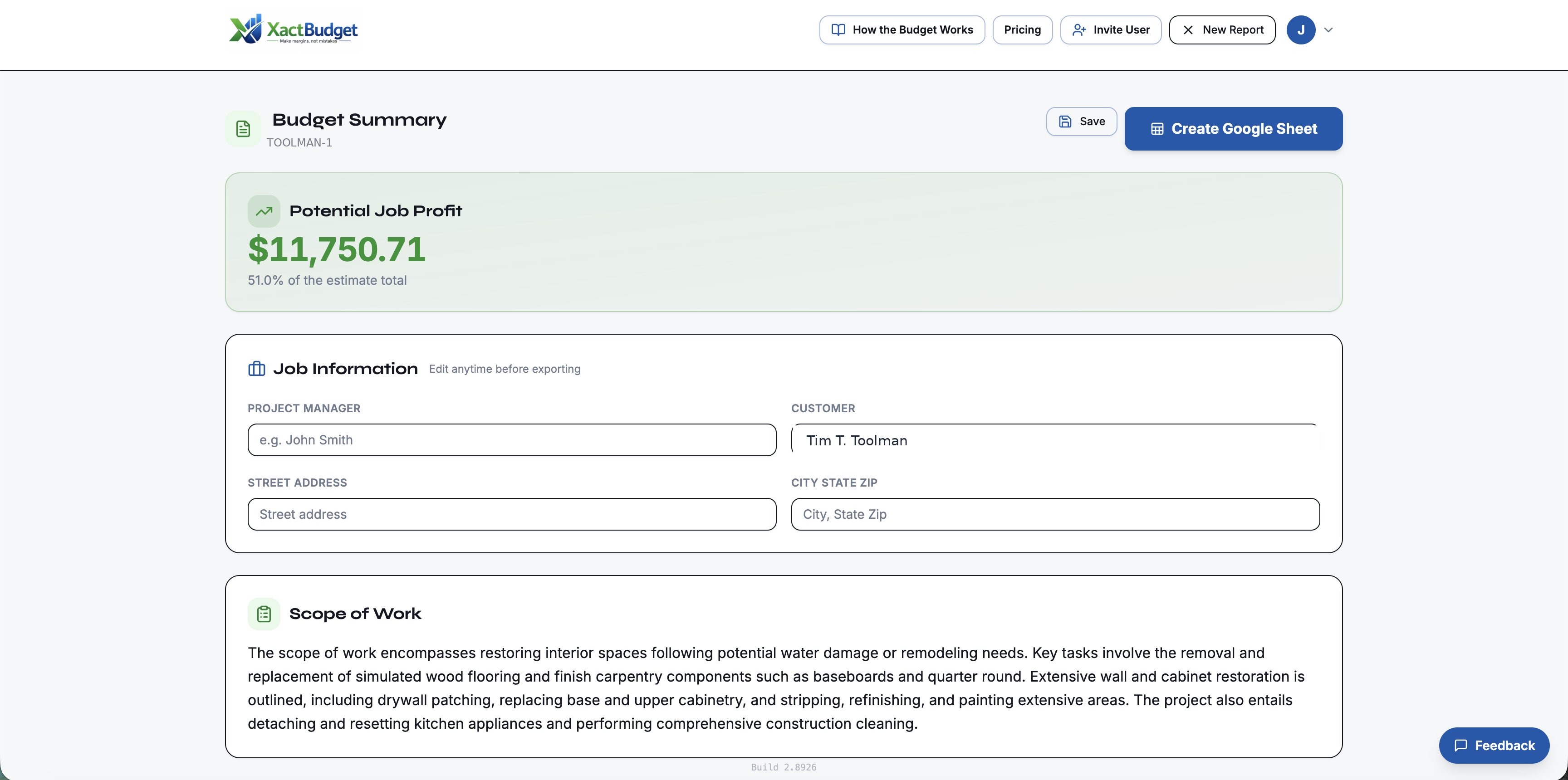
The numbers carry forward. XactBudget pulls quantities straight from the job's TAM report, brings in the customer's choices from XactSelect, and uses XactCalc's buy-it-by-the-box rounding on its Materials Sheet. The same line items, quantities and dollars show up at every step, so what the estimator wrote is what the PM budgets, orders and builds.
- 1Write it rightXactReviewXactScope
Review the estimate line by line and catch the scope that usually goes together but got left out, before it goes to the adjuster.
- 2Budget the jobXactBudget
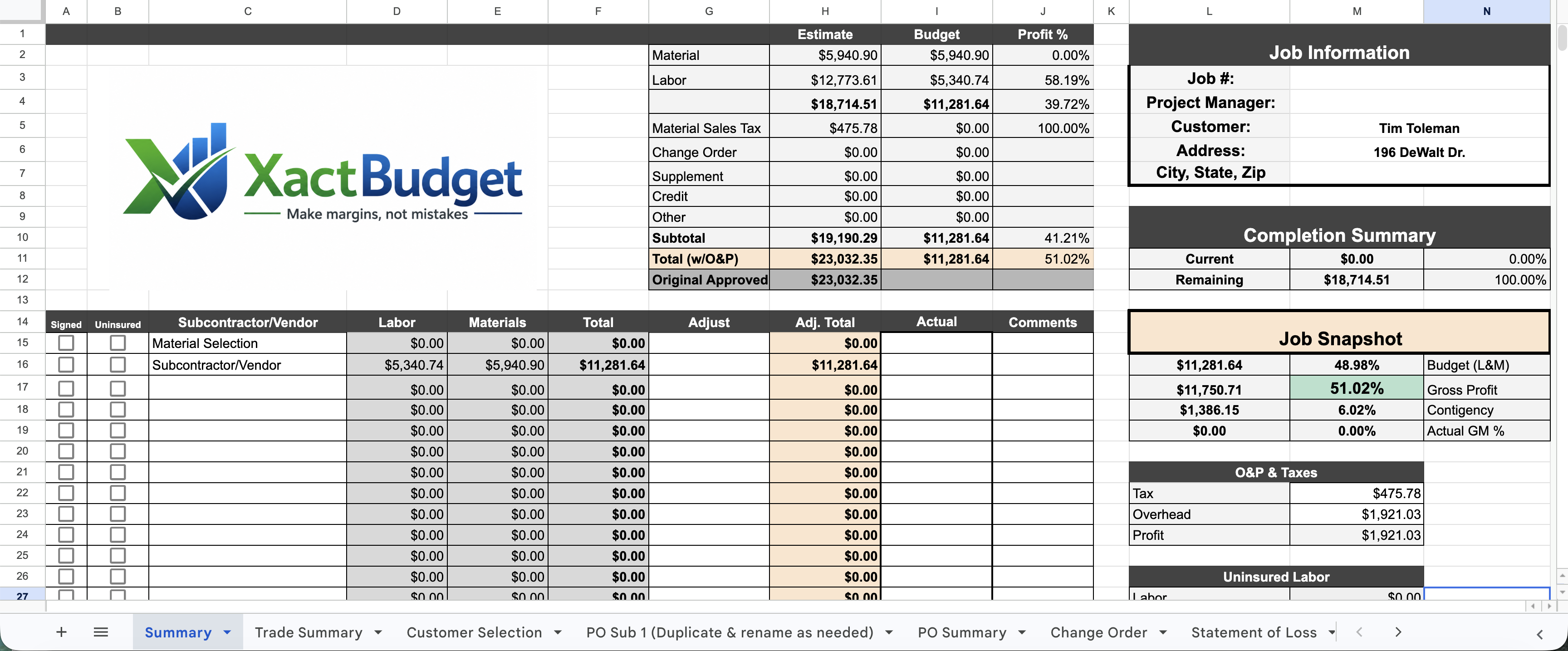
Turn the approved estimate into a trade budget. Assign subs and vendors, see your margin before you start, and print scopes and purchase orders.
- 3Let the customer chooseXactSelect
Send a selection sheet with only the items a homeowner actually picks. Their choices come back into the job paperwork.
- 4Order and buildXactCalcXactCrew
Round every material up to what you can actually buy, and hand your in-house crew a work order with labor hours by trade.
- 5Contents and the homeownerXactPackMy Claim Guide
Budget pack-out and pack-back in man-hours, and give the homeowner a guide to their claim so there are fewer surprises.
Start with the tool you need most. Each one works on its own, and every tool you add connects to the same jobs, the same team and the same numbers.
The tools
In the order a job uses them.
 Write it right
The estimator's home base for recon estimates, from the day one comes in to the day it's done. Review each estimate line by line, flag what needs to change, and print a clean change list for the writer or the adjuster. A dashboard shows every estimate and where it stands, so nothing sits and nothing slips.
 Write it right
Catch missed scope before the estimate goes out. XactScope compares an estimate against your own Xactimate line-item catalog and flags items that usually go together but are missing. It combines rules you control with an AI pass, so the suggestions fit how your company writes.
 Budget the job
Upload one Xactimate Summary Report and get a trade-by-trade budget built to protect your margin before the job starts. Assign every line to a sub or vendor, negotiate, and watch gross margin move. It prints the full job package with your logo: scopes of work, purchase orders, change orders, statement of loss, punch list and certificate of completion.
 Let the customer choose
Turn an Xactimate estimate and components report into a customer selection sheet in minutes. It pulls out only what a homeowner picks (flooring, paint colors, fixtures, finishes) with the room on every line. Send it as a link the customer fills out and signs, or print a clean PDF.
 Order and build
Xactimate prices materials in exact quantities, but suppliers sell in boxes, sheets and stock lengths. XactCalc rounds every material up to what you can actually buy. Trim is figured per wall, flooring rounds to whole boxes, and you see exactly what the rounding adds.
 Order and build
Turn an Xactimate estimate into a work order your in-house crew can run with. It shows total labor hours and wages by trade, with building materials and job supplies listed separately. The PM gets one clear work order per job, so the crew knows the budget before they start.
 Contents and the homeowner
Budget contents work in man-hours instead of hoping the crew moves fast. XactPack figures how long a pack-out, box cleaning and pack-back should take, built on SERVPRO's Quantity Calculation Tool and Xactimate's allowed hours, then produces a scope report or a preliminary estimate.
 Contents and the homeowner
A guide contractors give homeowners to help them understand and move through their insurance claim. Homeowners upload their policy to learn what it covers, follow a step-by-step roadmap, and keep dates, documents, receipts and payments in one place. It carries your company name.